⬡ Mission Management · Weight · Balance · Performance

The mission-prep flight deck for your whole fleet.

MissionXtra turns weight & balance, performance, fuel, weather, crew rostering and landing-site data into one fast, tap-driven iPad flight deck — paired with a Mac editor that keeps your whole fleet in sync. Built by operational helicopter pilots for EMS, SAR and offshore operators.
Built natively in Swift Works offline Multi-type fleet ready
Within limitsLive CG & mass check
📈
PC1 · Cat ALive performance class
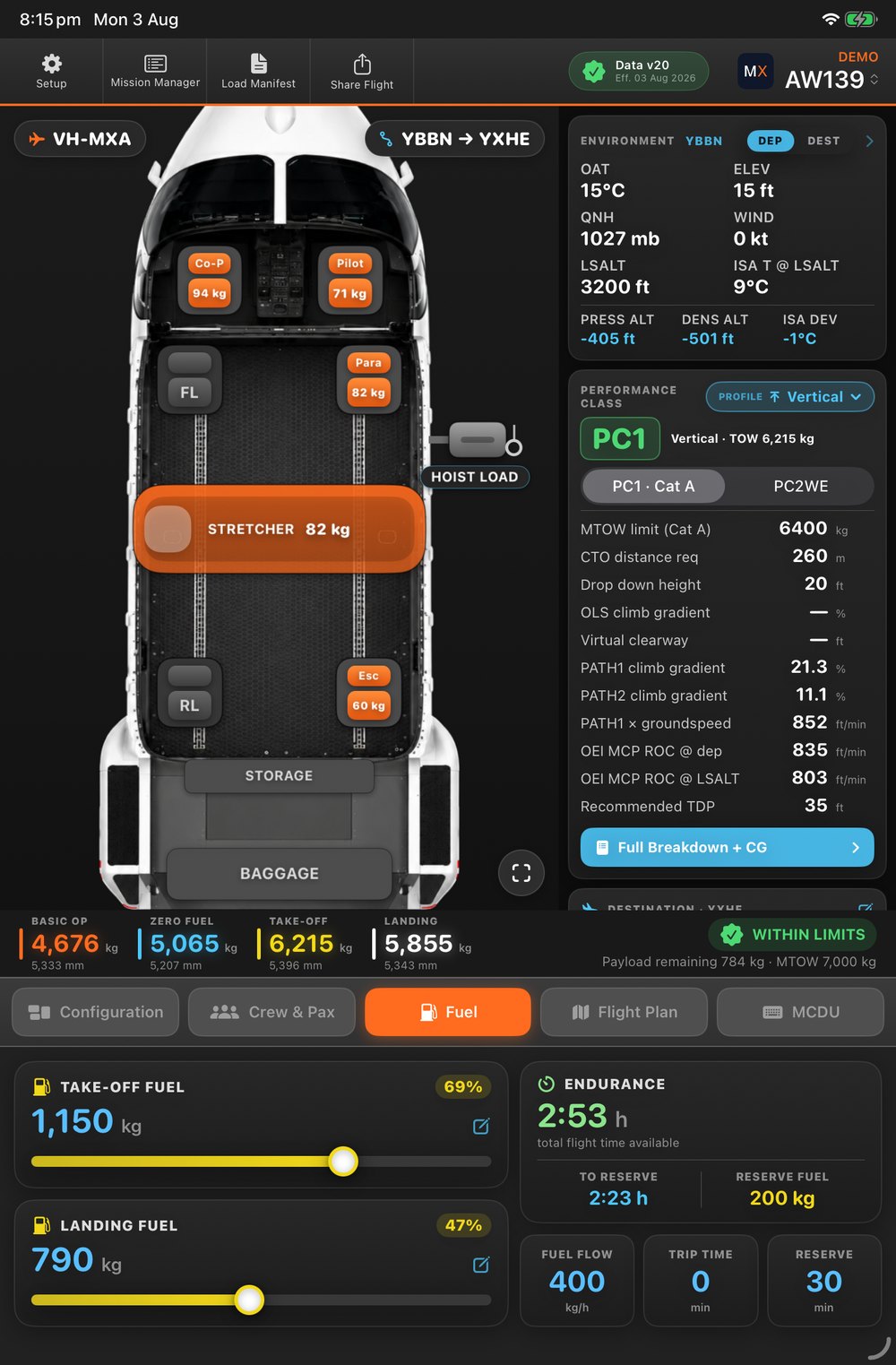
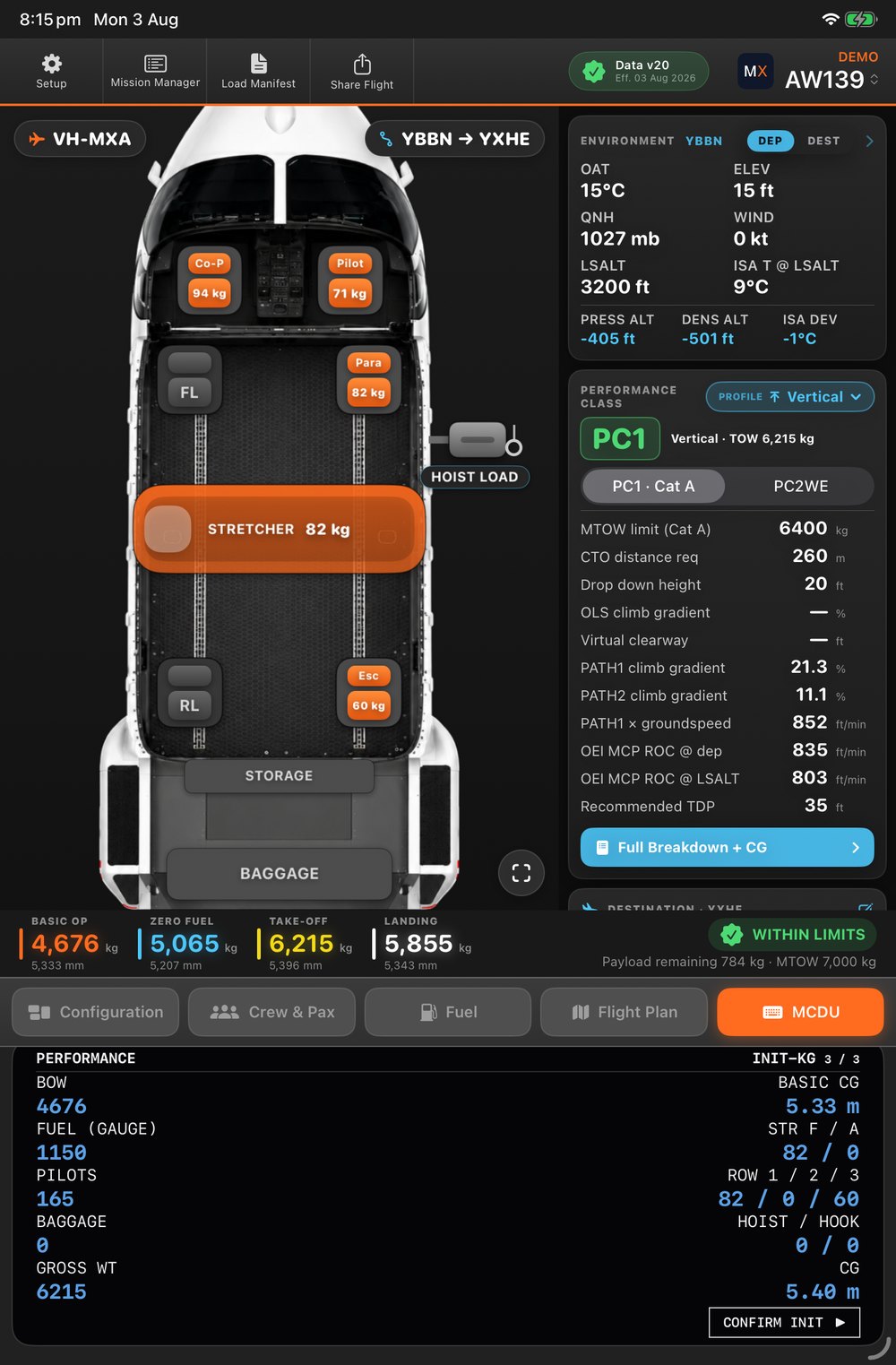
MissionXtra flight deck showing the cabin seat map, environment, performance class and dual CG envelopes
1e-6

Golden-tested W&B accuracy

5+

Rotorcraft types supported

100%

Native Swift, offline-capable

OTA

Operator-approved data sync

One platform, no spreadsheets

Everything mission-critical, in one tap-driven deck

MissionXtra replaces the spreadsheets, paper trim sheets and disconnected tools with a single screen that recomputes the moment you load the aircraft.

🧮

Live tap-to-load W&B

Load crew, patients, equipment and fuel directly on a scaled aircraft fuselage. CG, limits and margins recompute instantly — no spreadsheet juggling.

📈

Obstacle-aware performance

Five RFM take-off procedures and four landing techniques, with the app solving for the lowest TDP that clears your obstacle — and flagging when you fall outside PC1.

📍

Your own HLS register

Surveyed landing sites with their real approach and departure obstacles — pre-filling the performance page the moment a leg lands there.

🌦️

Weather that follows the plan

Departure METAR at take-off, destination TAF at ETA — auto-refreshed per leg, with area-QNH fallback for off-aerodrome sites.

🗓️

Shift roster, synced

Day and night crews rostered per base in the editor, published to every iPad — so the right crew loads with one tap.

📋

Manifest, report & share

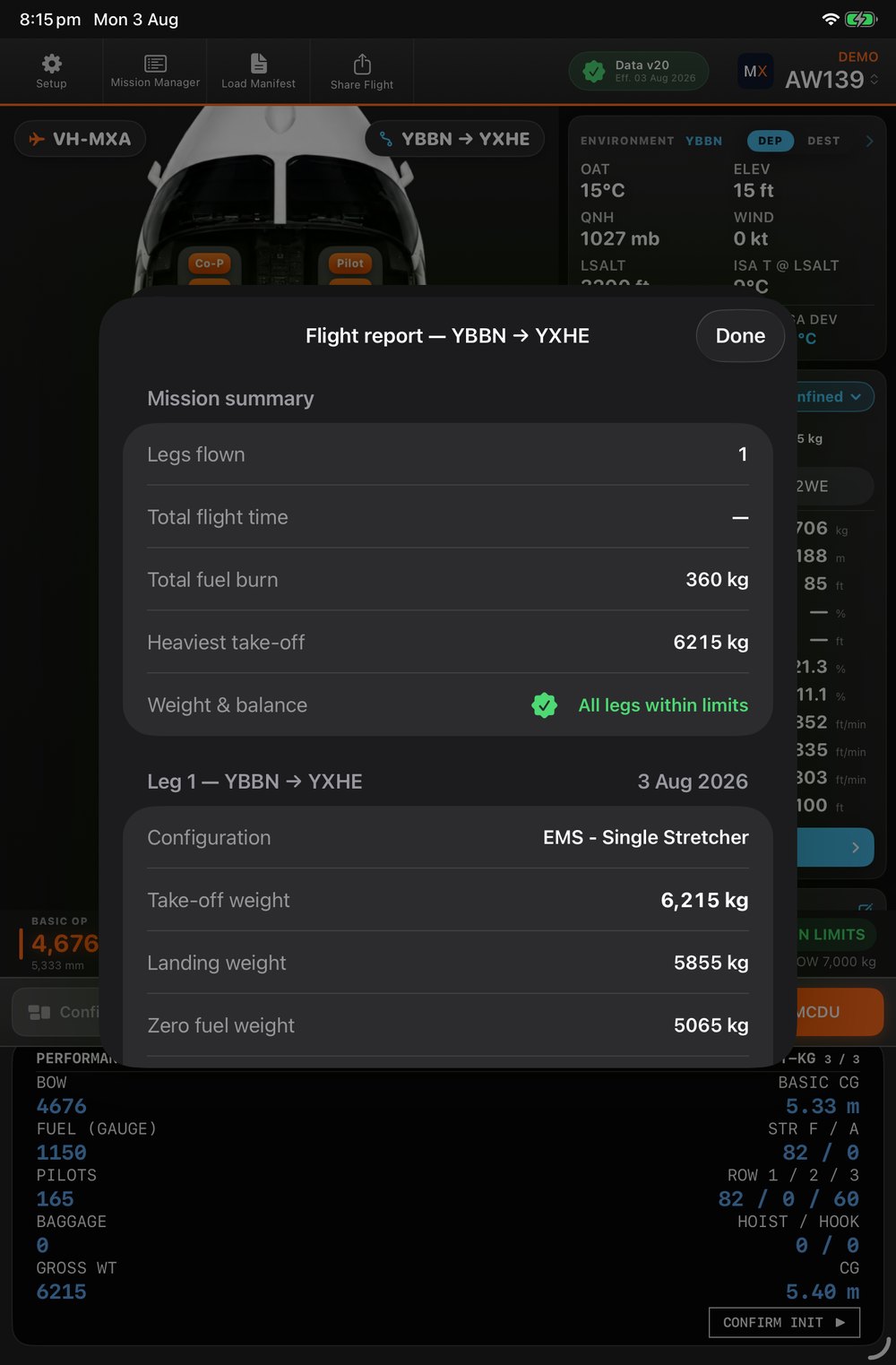
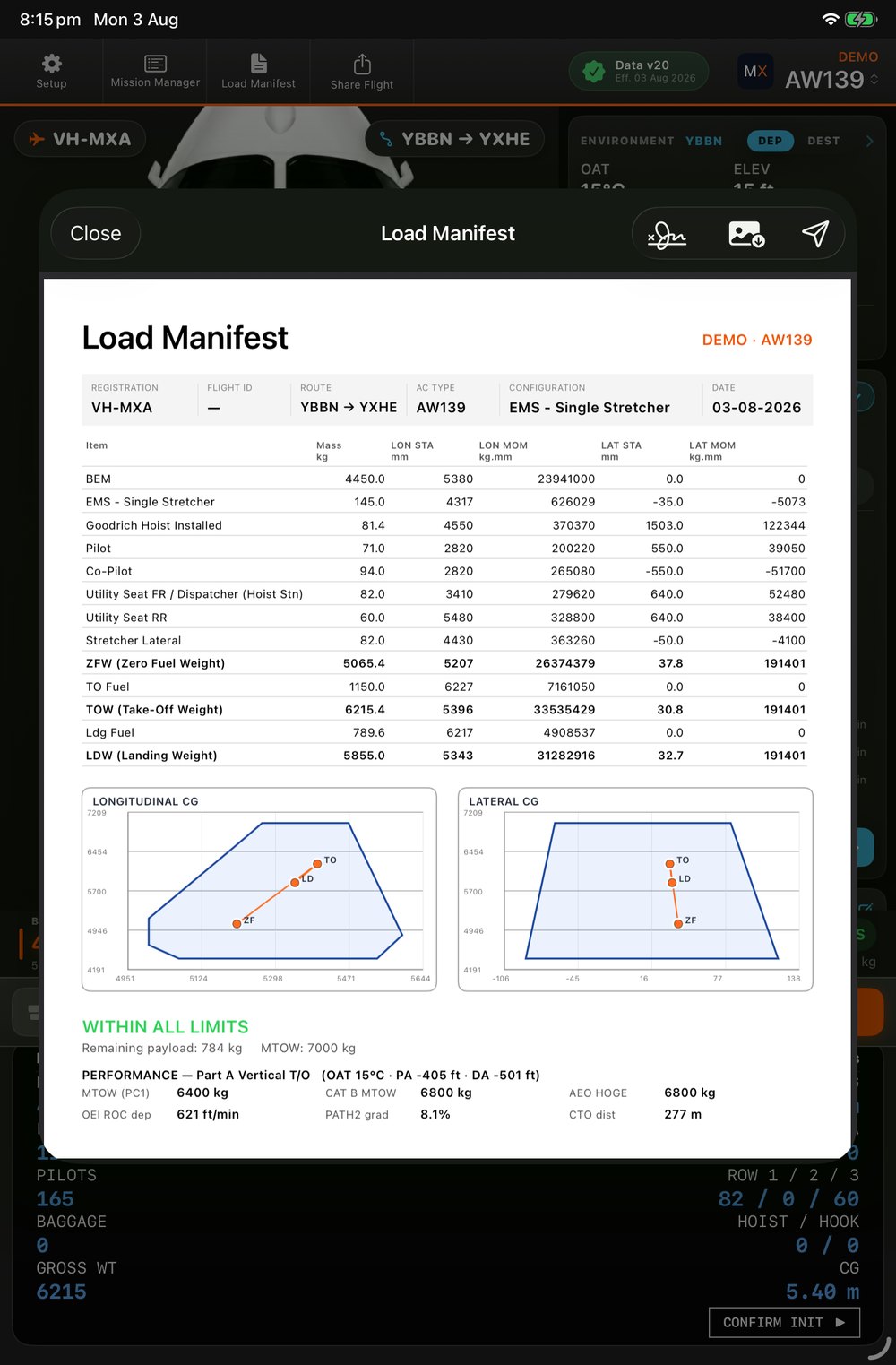
A signed A4 load manifest, an end-of-mission flight report, and one-tap AirDrop of the whole flight to another crew's iPad.

Weight & Balance

Load the aircraft the way you actually see it

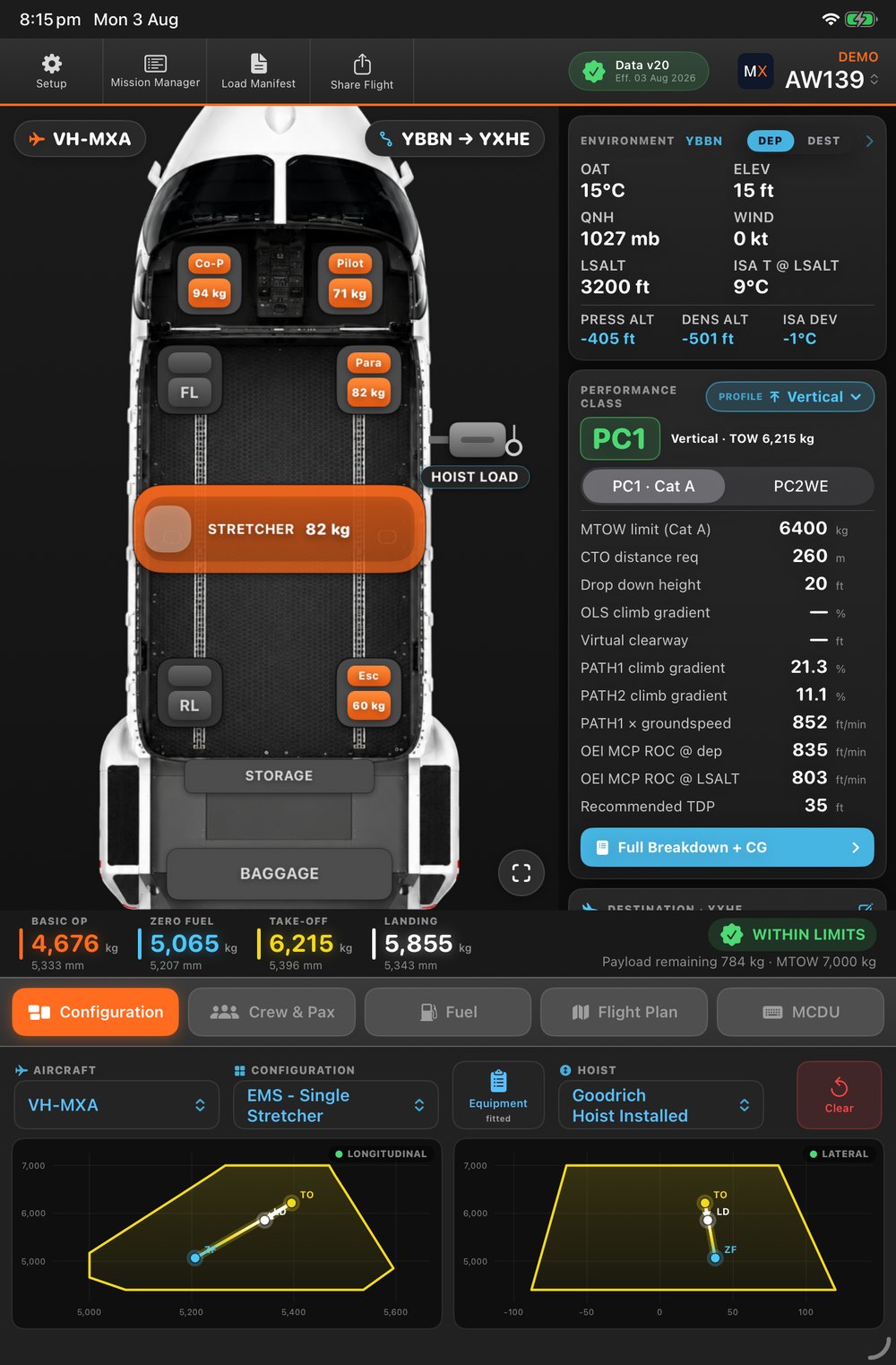
Tap a seat to type a weight, or drag a crew card straight onto the cabin. Dual CG envelope charts plot the Zero-Fuel → Take-off → Landing loading line, and the deck frames in pulsing red the instant a load goes out of limits.
  • Drag-to-seat crew & paxNamed people auto-vacate any other seat — no double counting.
  • Dual longitudinal & lateral envelopesSee fuel-burn CG travel against the approved envelope at a glance.
  • Hoist-aware limitsSwitches to the extended lateral (hoist) envelope only during an actual lift.
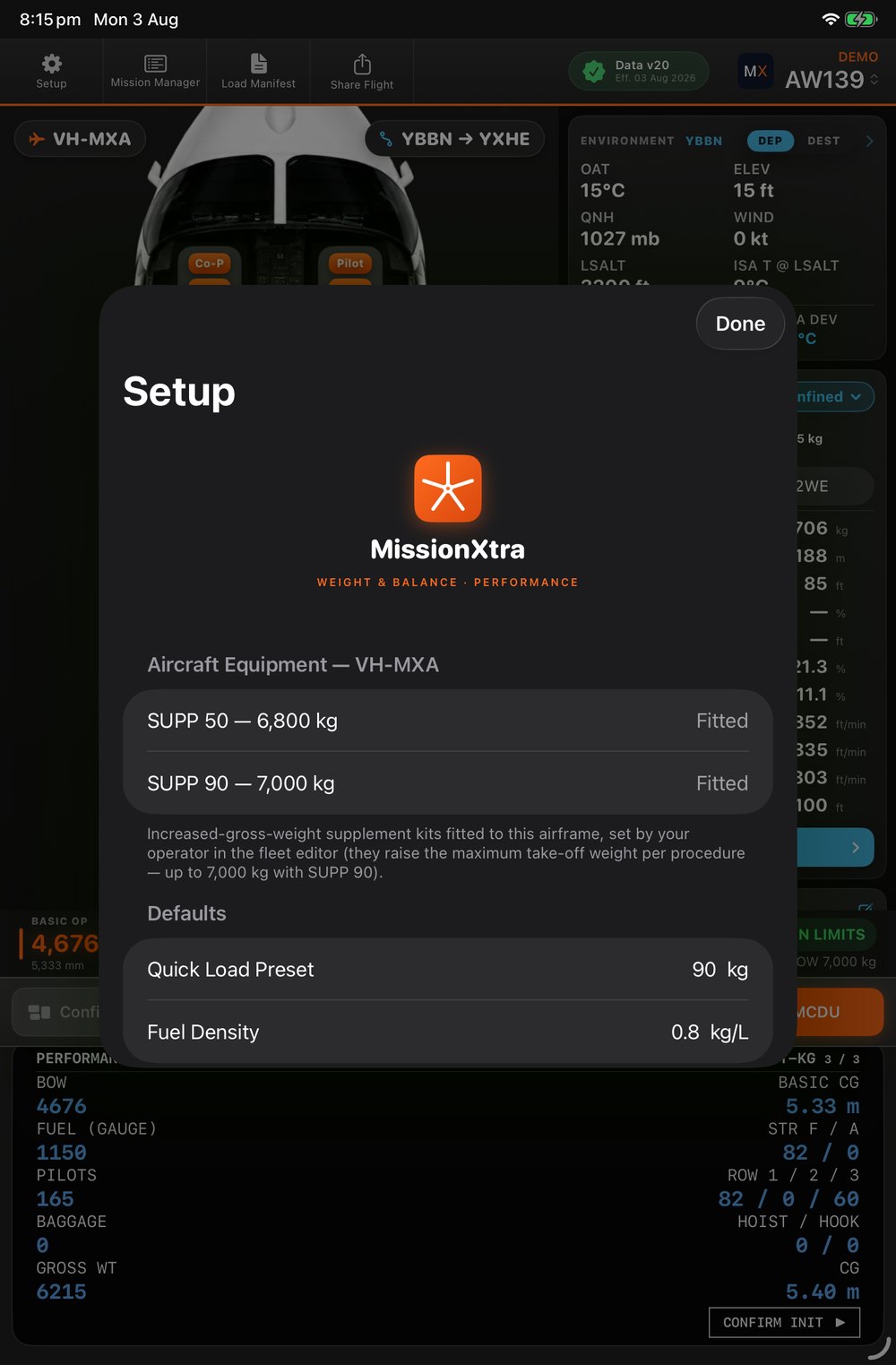
  • SUPP kit MTOW handling6,400 → 6,800 → 7,000 kg, driven by each tail's fitted kits.
Signed A4 load manifest with item table and dual CG envelope charts
Crew & Cabin

Today's crew, already on the aircraft

Your operator rosters day and night crews per base in the Mission Editor. The iPad knows which shift is on now — load the whole crew with one tap, with weights already verified. Switch cabin configurations and every limit and station updates live.
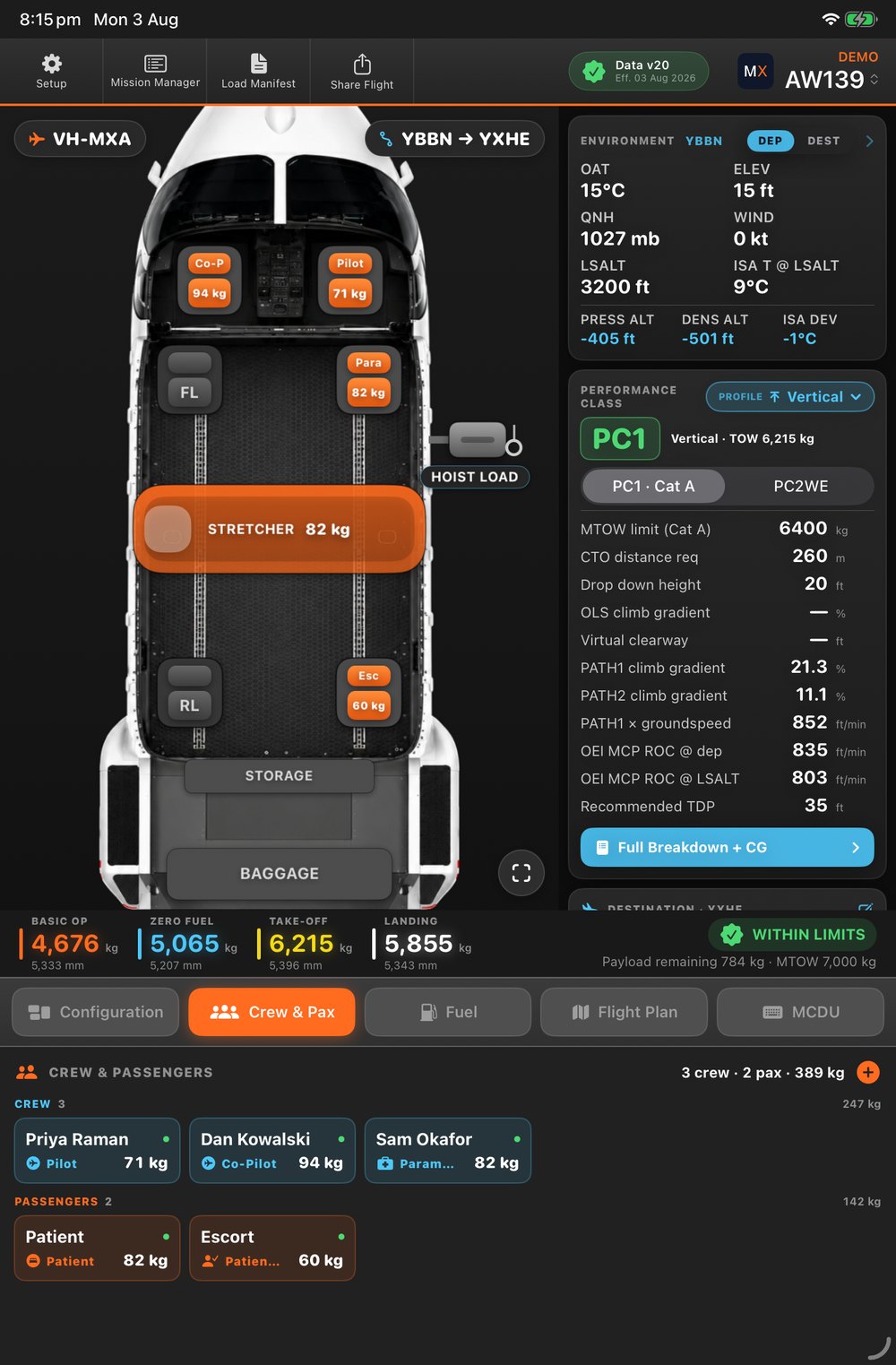
  • One-tap shift crewThe roster for this base and this shift, loaded and seated.
  • Roster-change advisoryTells you who's in and who's out — seats are never changed without you.
  • Per-config equipment togglesFit or remove items and add ad-hoc equipment for this flight.
  • Placard & station overload detectionMaster-caution alert names the exact violation.
Crew and passengers loaded on the deck
Fuel · Weather · Route

Every leg gets the forecast for its time

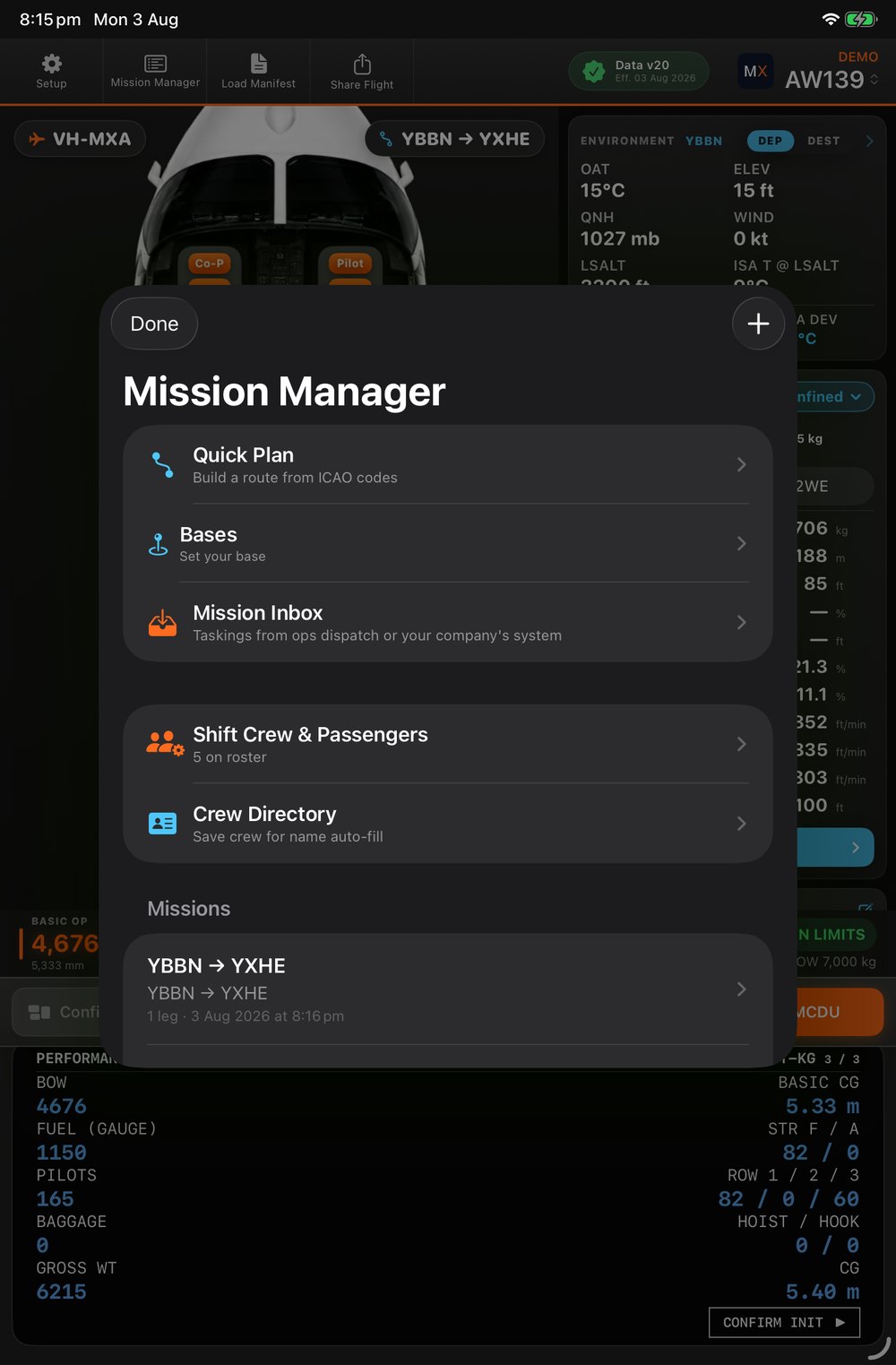
Build a route from ICAO codes or lat/long, or import the plan you already made. The app pulls the departure METAR for take-off and the destination TAF for your ETA — with area-QNH fallback for scene sites and terrain elevation for bare coordinates.
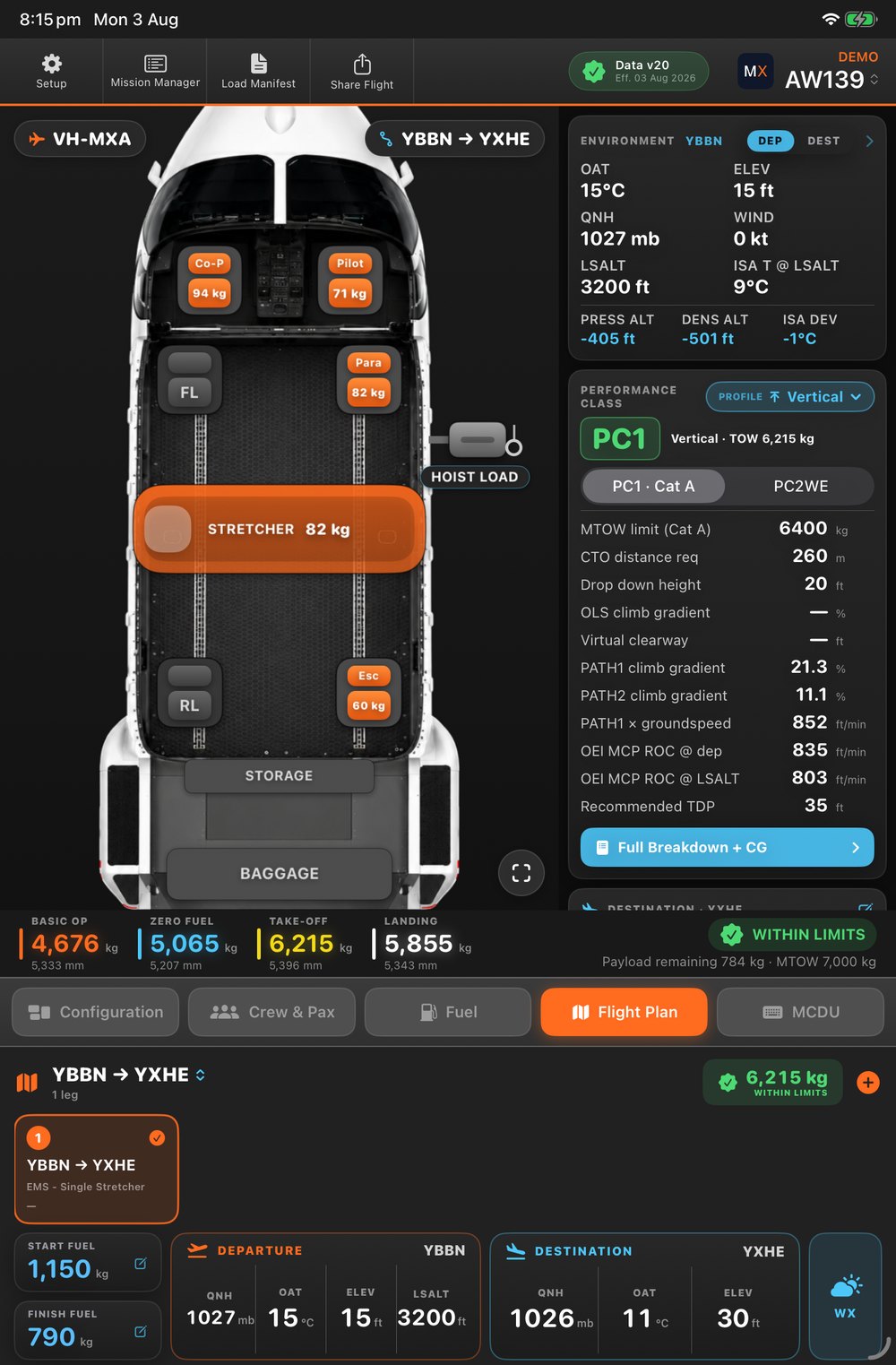
  • Weather follows the flight planDeparture and destination refresh per leg, automatically.
  • OzRunways .ozpln importFly the plan you built — no re-keying.
  • Per-leg configurationsDepart in one fit, return in another — each leg keeps its own.
  • Endurance & below-reserve alertingInstant fuel-state confidence for the whole mission.
Multi-leg flight plan with per-leg departure and destination weather
Performance

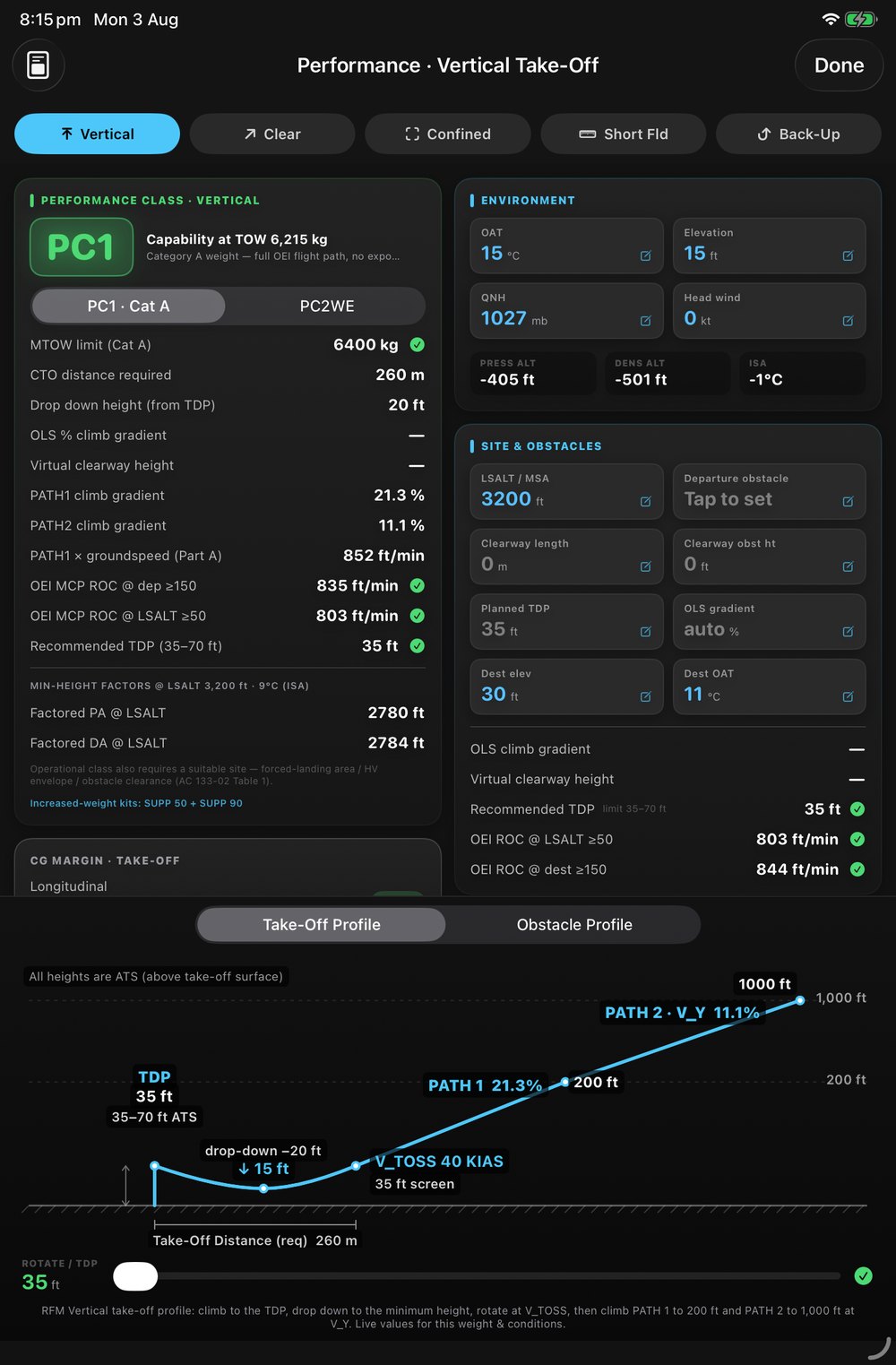
RFM performance you can see and defend

The right RFM procedure for the site, computed for your conditions — with honest performance-class exposure clearly flagged.

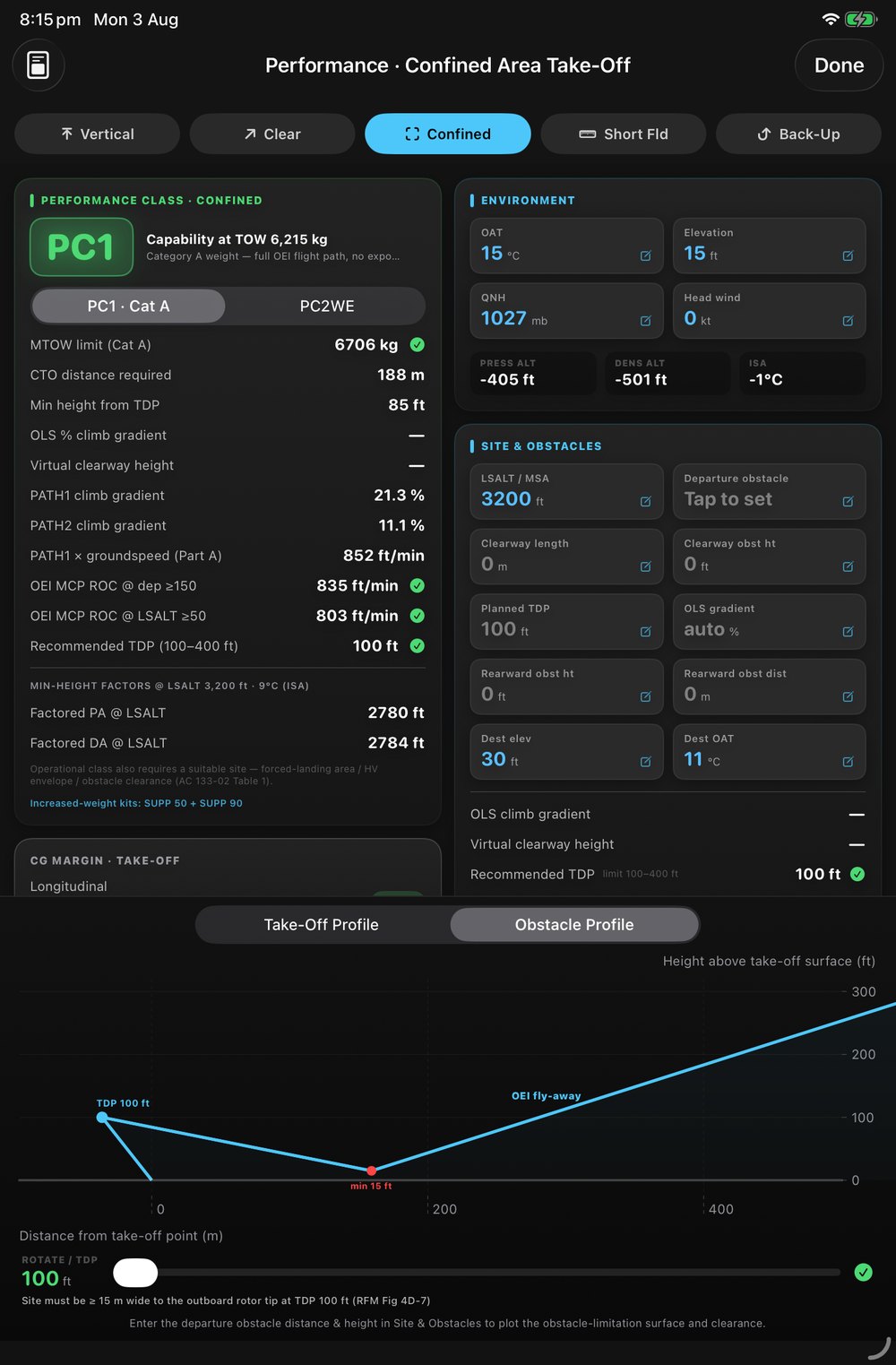
✓ PC1 · Cat A at TOW 6,215 kg

It solves for the lowest TDP that clears your obstacle.

Vertical, Clear Area, Confined Area, Short Field and Back-Up take-offs each carry their own WAT limit, OEI climb and distances. Enter the obstacle and MissionXtra searches the Cat A band for the lowest rotate height that clears it — then tells you plainly when no TDP will, and drops you to PC2WE rather than hiding it.
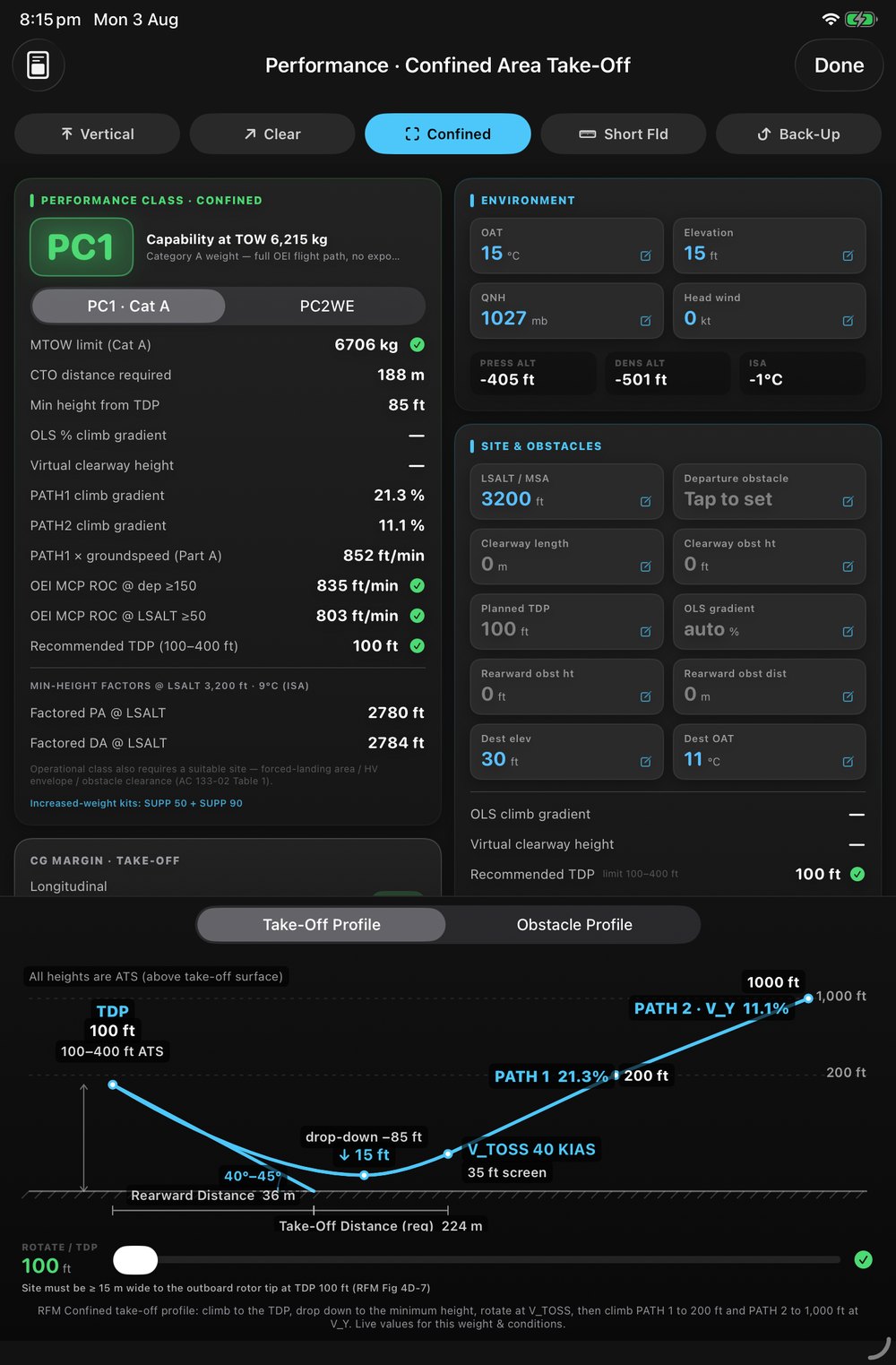
  • 5 take-off procedures · 4 landing techniquesHeliport, Confined, Offshore Helideck and Clear Area, each with its own LDP.
  • Live take-off, obstacle & landing profilesDrawn to scale with PATH 1 / PATH 2, drop-down and VTOSS.
  • Rearward & lateral obstacle checksConfined-area zone and site-width checks, not just the front.
  • WAT, OEI ROC, PATH2 gradient, CTO distance, HOGE
Confined-area take-off profile showing the rearward climb, TDP and obstacle clearance
For operators · Mac app

The Mission Editor — your fleet's command centre

A native Mac app where your team authors aircraft, configurations, crew, rosters and landing sites — then publishes it over-the-air to every pilot's iPad. Author → check → publish → your crews fly it.
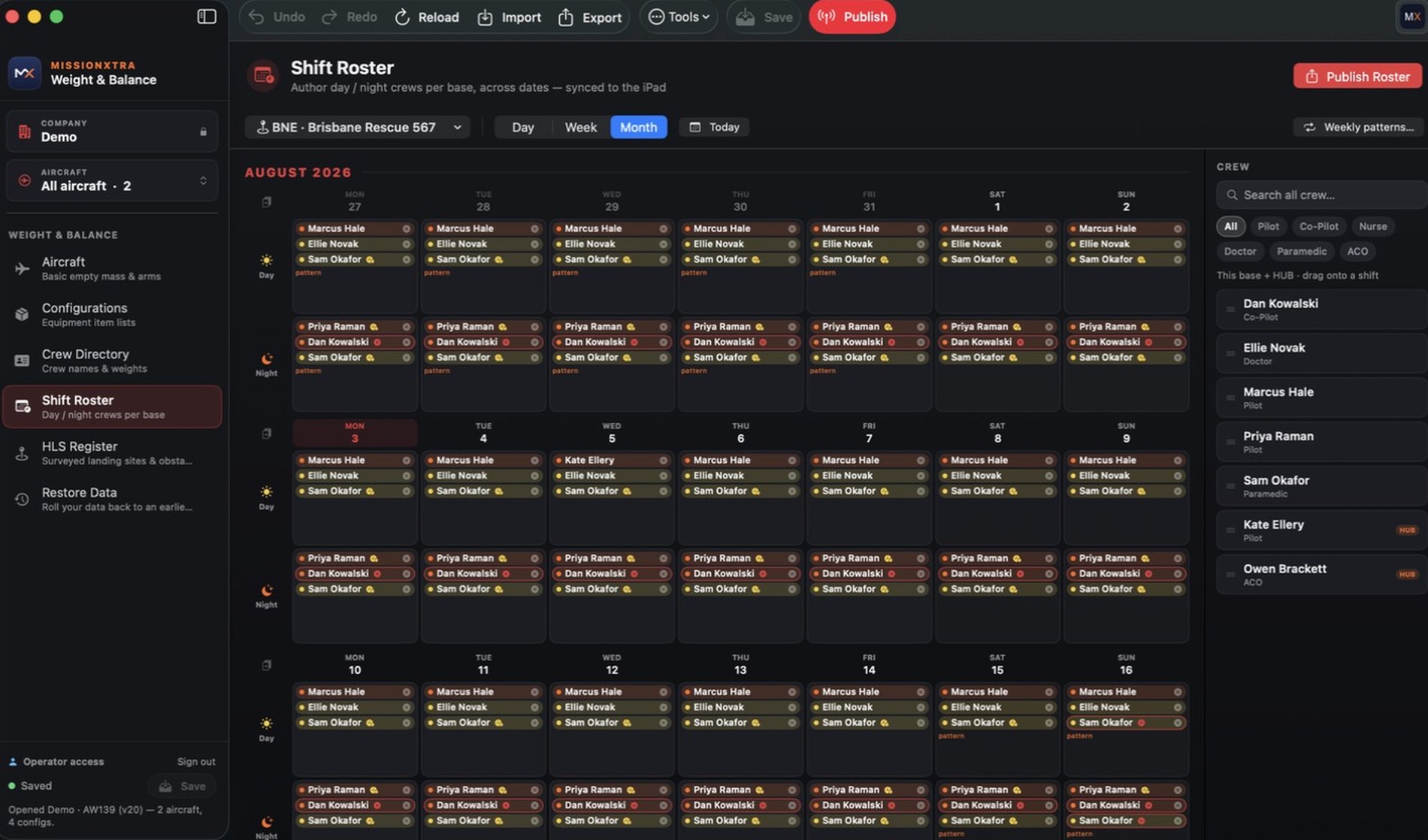
MissionXtra Mission Editor showing the Shift Roster with day and night crews across a month
Aircraft BEM & CG arms Configurations equipment lists Crew Directory names & weights Shift Roster day / night per base HLS Register surveyed sites Restore Data point-in-time

Aircraft, Configurations and Crew Directory are included with every plan. Restore Data is included from Professional. Shift Roster and HLS Register are optional modules.

New · Shift Roster

Roster day and night crews, weeks ahead

Drag crew onto a shift, set a recurring weekly pattern, or copy a whole week forward. Expiring qualifications are flagged on the date the crew will actually fly — not just today. Publish once and every pilot's iPad loads the right crew with a single tap.
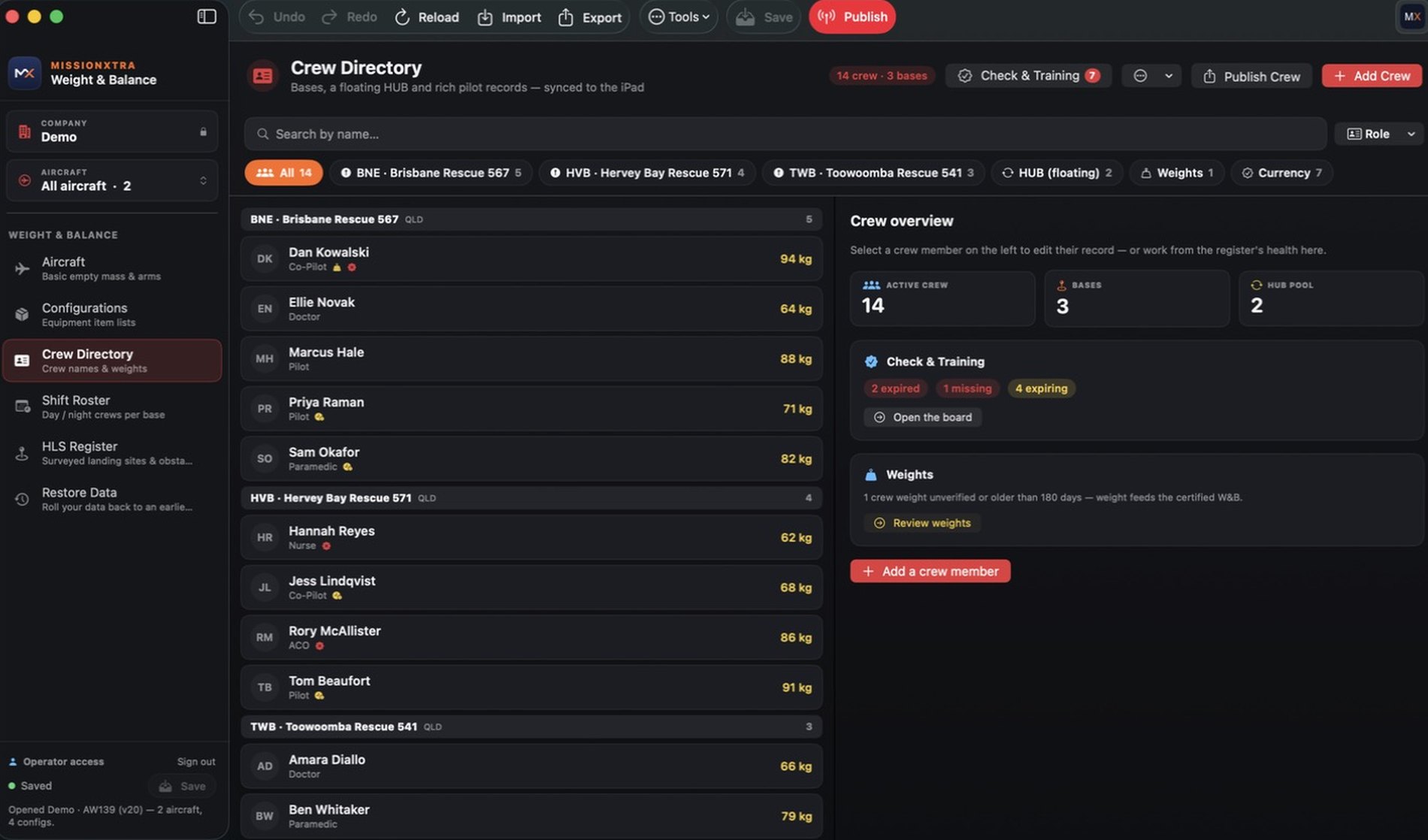
  • Day, Week and Month viewsPer base, with a floating hub pool for shared crew.
  • Recurring weekly patternsAuto-fill every matching date, then override the exceptions.
  • Qualification badgesAdvisory only — it never blocks a roster.
Crew Directory with bases, crew overview and Check & Training compliance
New · HLS Register

Turn your site survey folder into live performance data

Record each landing site's surveyed departure and approach obstacles the way the flight manual actually assesses them — balked-landing obstacles beyond the pad, approach obstacles under the path, and the rearward obstacle for confined-area work. When a plan lands there, the pilot's iPad pre-fills elevation, obstacle and limits automatically.
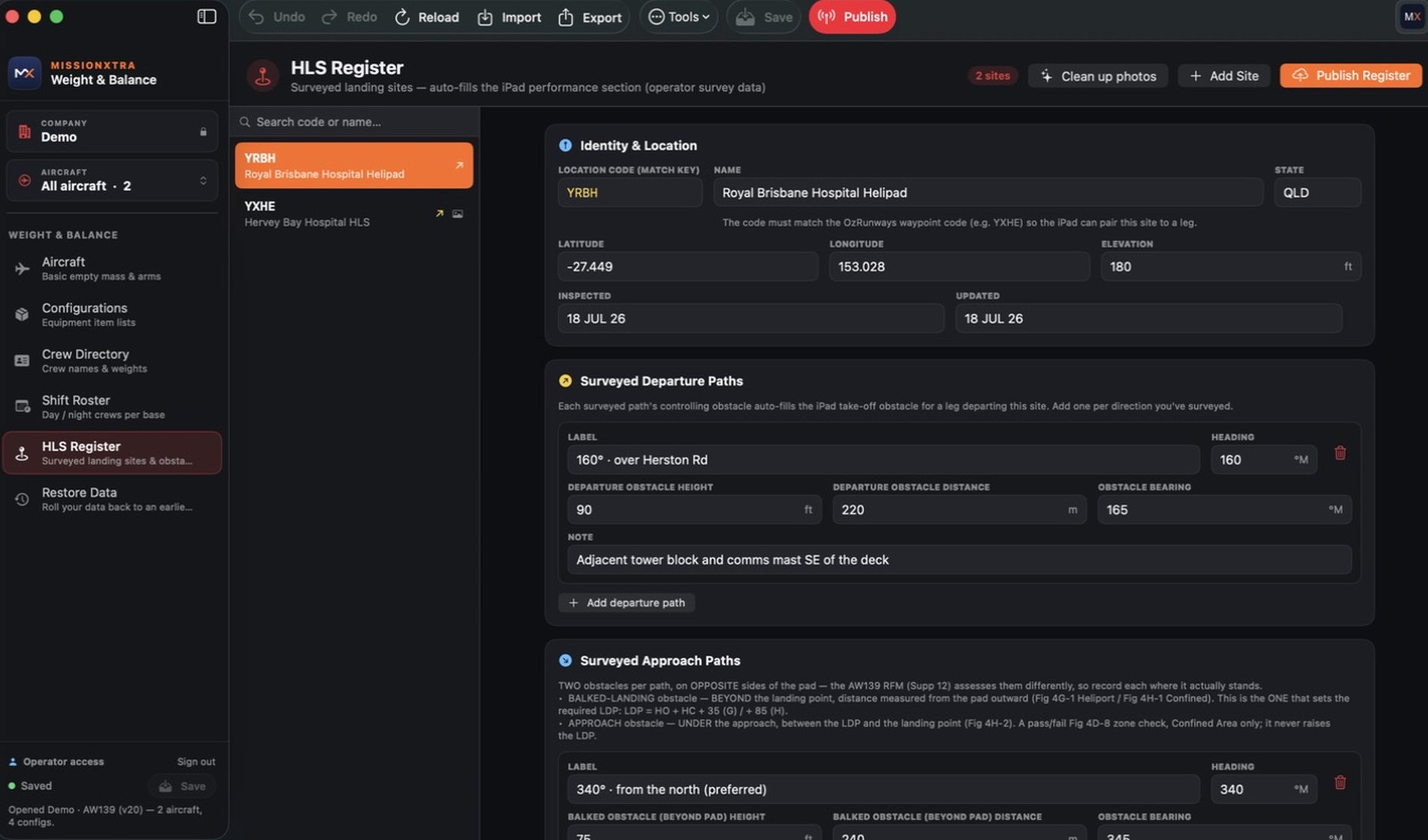
  • Matched to your flight-plan waypointsPairs to the leg by location code.
  • Annotated site photosAerials and departure-path diagrams on the pilot's site card.
  • Clearly badged as operator survey dataAdvisory, and overridable in one tap.
HLS Register showing a surveyed site with departure and approach obstacle data
New · Restore Data

Undo a bad publish yourself, in under a minute

Every version you've ever published is kept and checksum-verified. Pick an earlier point, read a plain-English diff of what comes back and what goes, and re-publish. Nothing is deleted, so you can always roll forward again — and signed-off tails are protected from rollback by design.
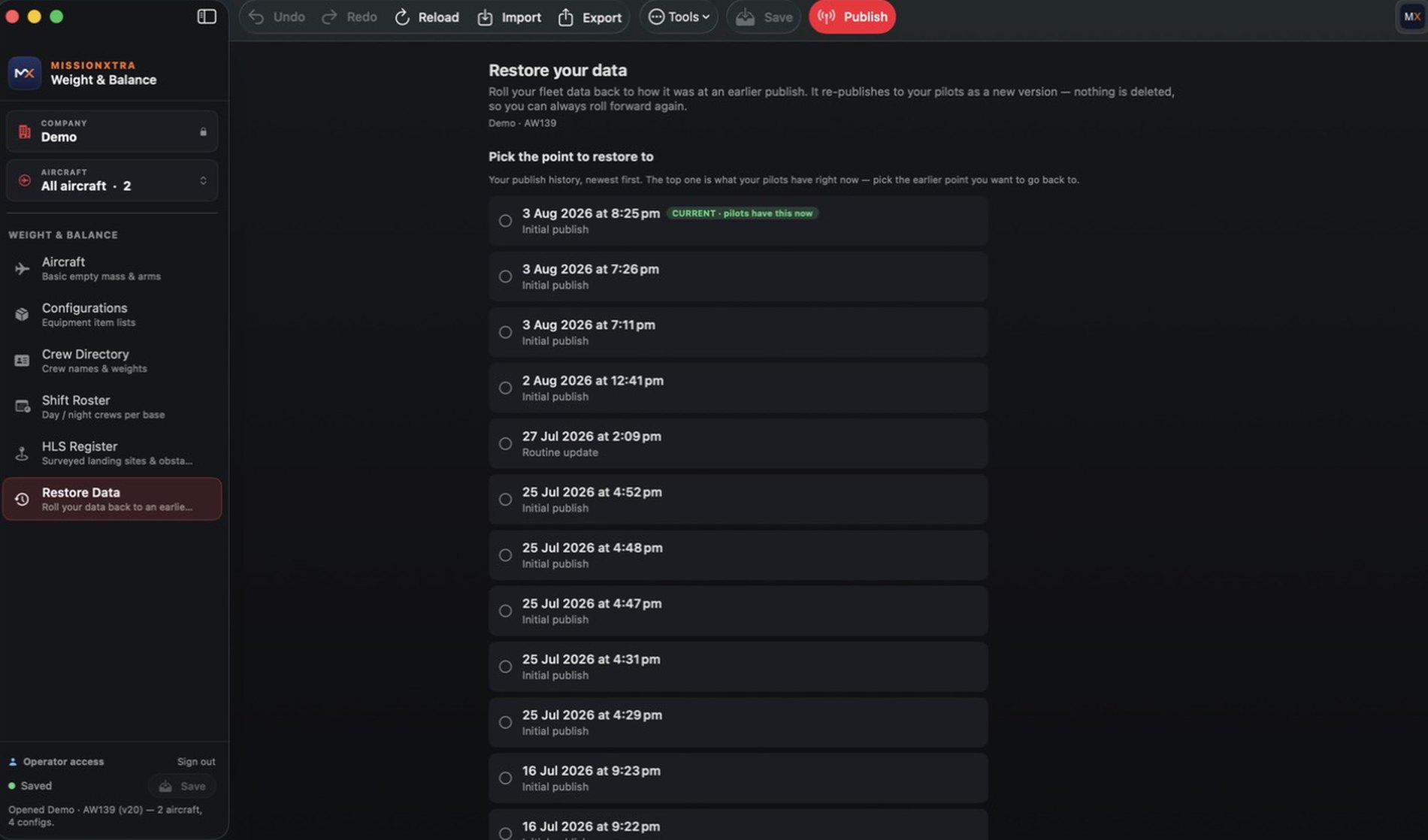
  • Full publish historyThe current release is badged so you always know what pilots hold.
  • Integrity checked before restoreA corrupt backup simply won't be applied.
  • No support ticket requiredOperators recover their own data.
Restore Data showing the publish history timeline with the current release badged
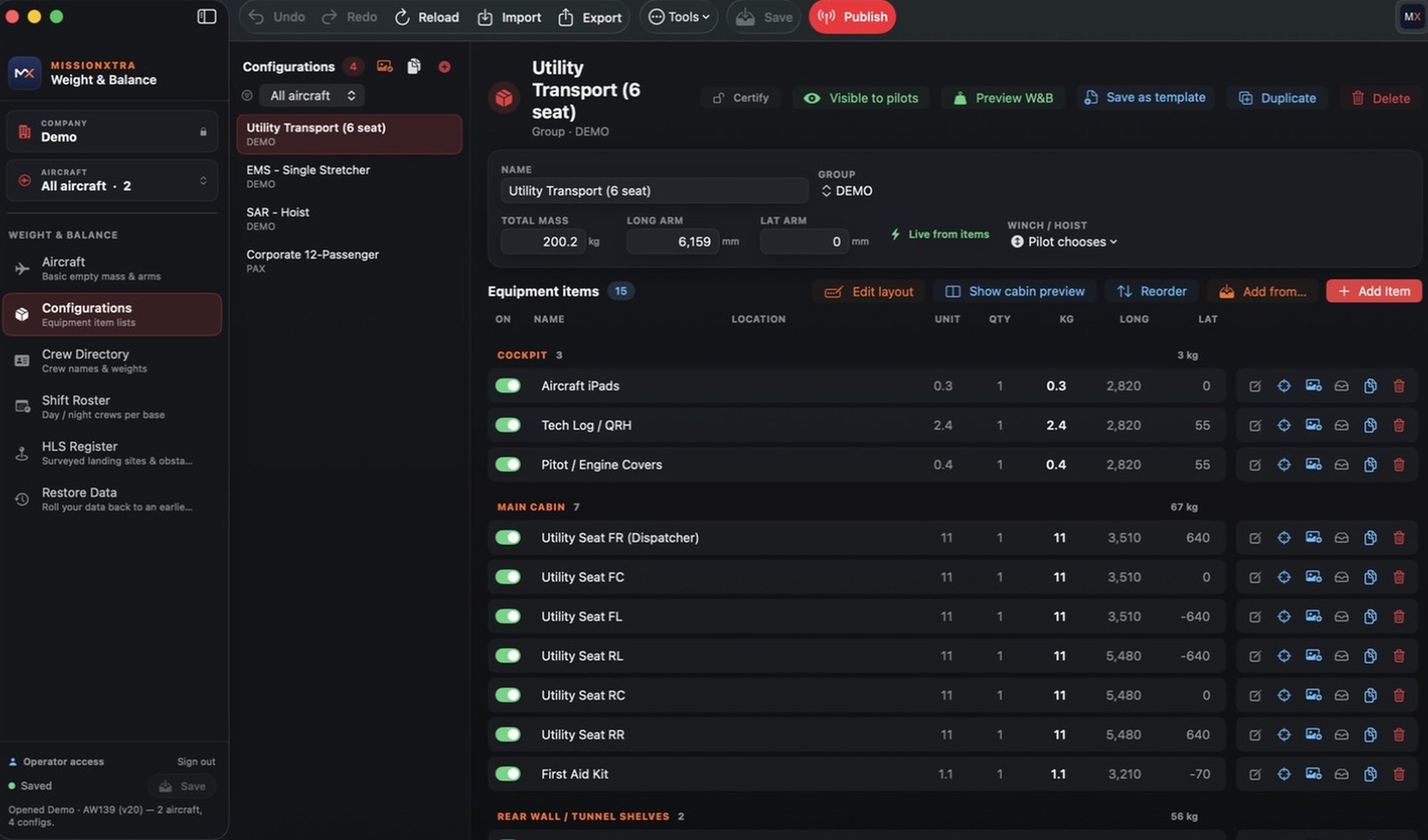
Configurations editor with equipment item list

Configurations & equipment

Build each cabin fit item by item, preview the W&B before you publish, and save any config as a reusable template.
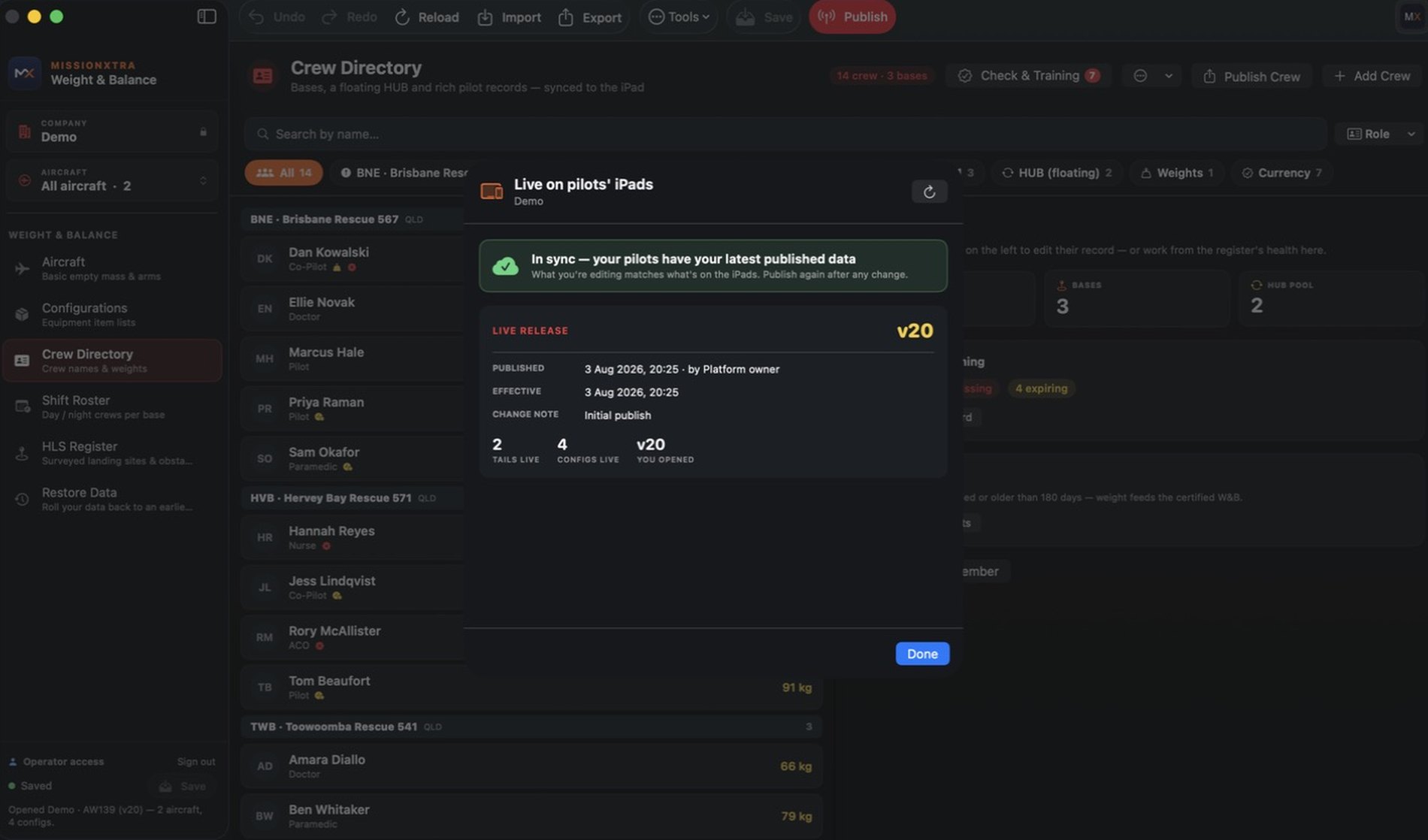
Live on pilots' iPads showing in-sync status

Live on pilots' iPads

See at a glance whether your crews hold your latest release — with the live version, publish time and change note.
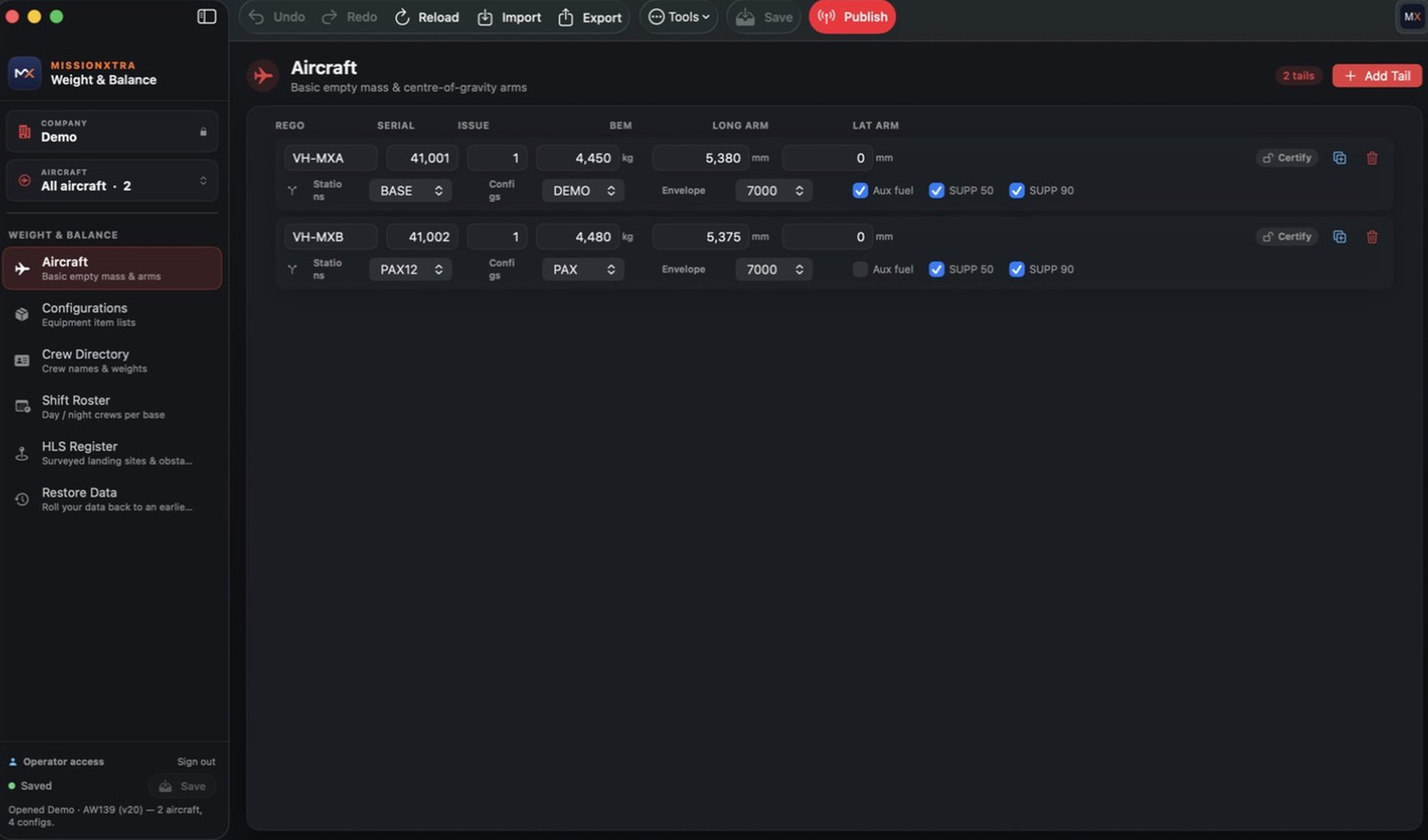
Aircraft editor with basic empty mass and CG arms

Aircraft, imports & reports

Paste a fleet straight from a spreadsheet, duplicate a sister ship, and export branded fleet reports and activity history.

Configurations

Build any cabin fit — without waiting on us

Every role your aircraft flies is a configuration: EMS single-stretcher, SAR hoist, utility transport, 12-passenger. You build and adjust them yourself, item by item, and your pilots see exactly what you publish.
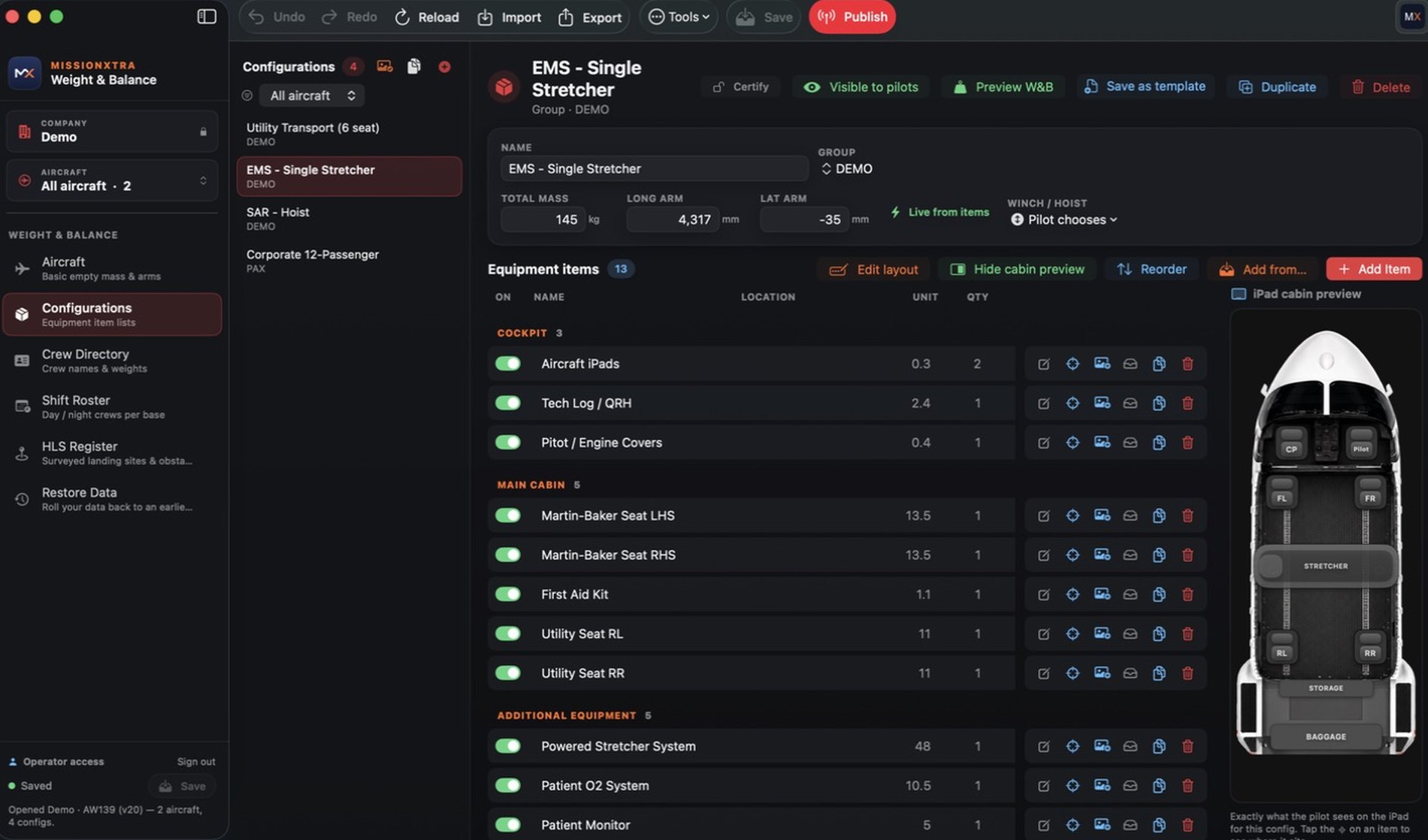
Configurations editor showing equipment items grouped by cabin zone alongside the live iPad cabin preview
Equipment item list with per-item toggles

Add your equipment

Enter each item with its weight, arm, quantity and cabin zone — stretchers, hoists, medical kits, seats, life rafts. Attach a reference photo so crews know exactly what it is.
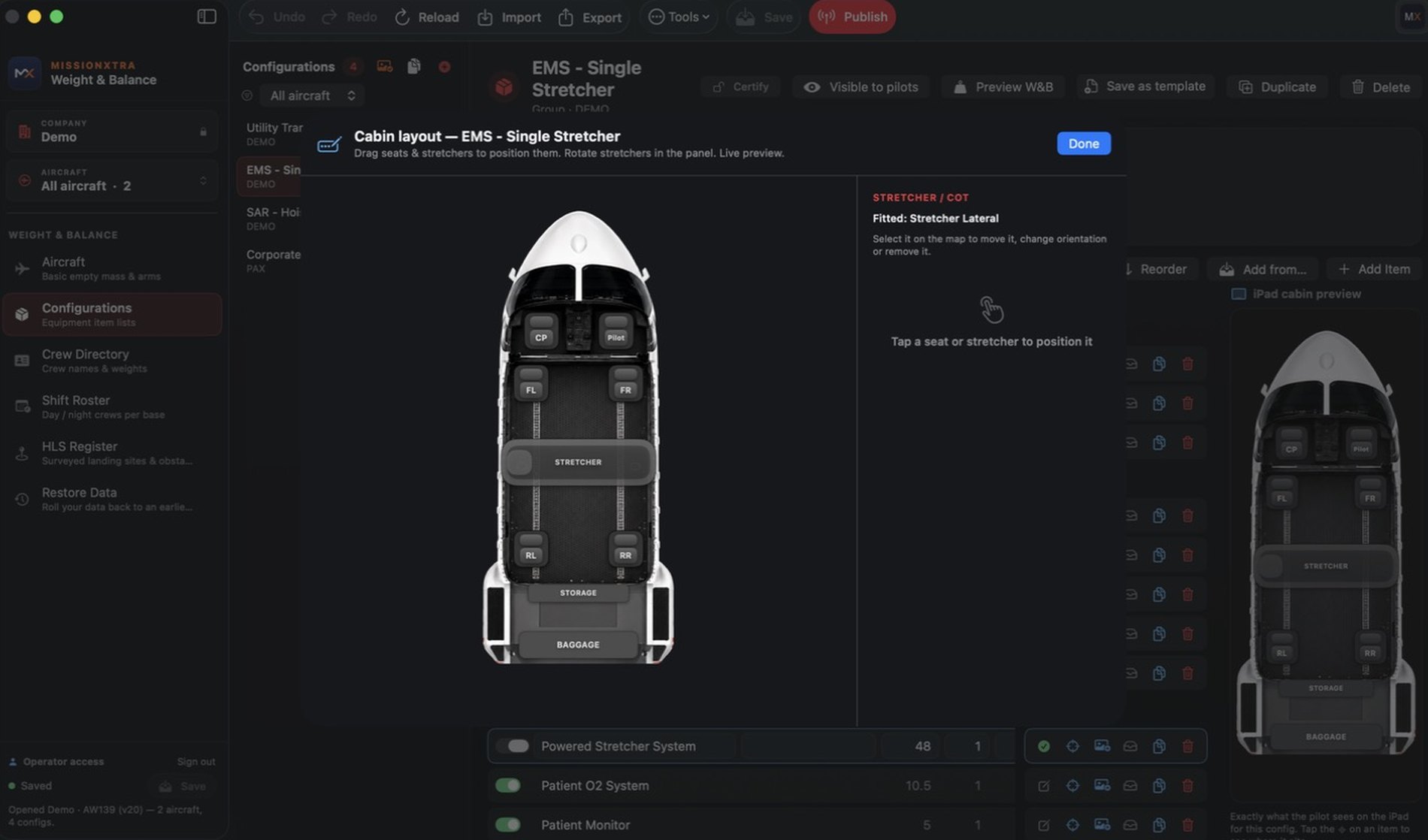
Cabin layout editor with draggable seats and stretchers

Lay out the cabin

Drag seats and stretchers onto the fuselage and rotate them into the real orientation. It's the same cabin map your pilots load against, so what you draw is what they tap.
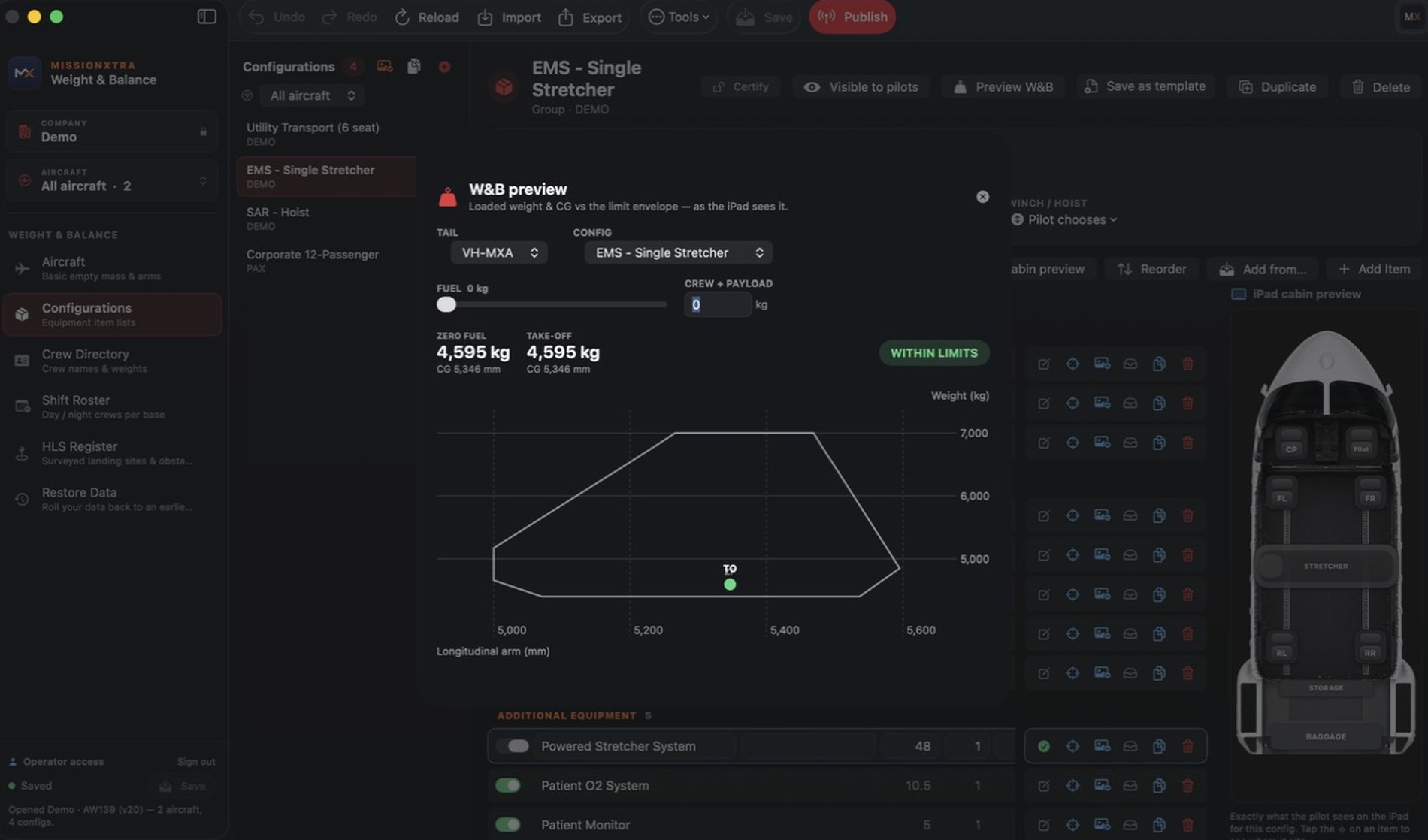
W&B preview showing loaded weight and CG against the envelope

Check before you publish

Preview the loaded weight and CG against the envelope exactly as the iPad will compute it — sweep the fuel and payload, confirm it sits within limits, then publish.

🔀

Duplicate & template

Clone a config to spin up a variant, or save it as a template to reuse across tails and bases.

👁️

Visible to pilots

Keep a config hidden while you build it, then flip it live when it's ready to fly.

🎚️

Fitted or removed

Toggle any item on or off. Pilots can adjust the loadout in-flight without breaking your baseline.

🪝

Winch & hoist aware

Declare the hoist fit per config so the app applies the correct extended lateral envelope.

Operators

Your portal — and where the Editor lives

Sign in to the MissionXtra client portal to download the Mission Editor for Mac and manage your fleet online. The Editor isn't sold in any app store — it's issued to operators through this portal, and keeps itself up to date automatically once installed.

  • Download the Mission EditorSigned & notarised Mac app, for licensed operators only.
  • Edit aircraft, configs, crew & brandingEverything your pilots see, managed in one place.
  • Publish versioned data over-the-airFull version history with one-click rollback.
  • Secured with two-factor authenticationEach operator's data is isolated with row-level security.
How it works

From cold start to signed manifest in minutes

Pick aircraft & config

Choose the tail and cabin configuration — your operator's approved data is already synced.

Load the cabin

Load today's shift crew with one tap, add patients and equipment, and watch CG settle live.

Plan & check

Add the route, pull per-leg weather, and check the take-off and landing profiles against your obstacles.

Sign & share

Capture the PIC signature and share a professional A4 load manifest PDF — paperless.

A closer look

Designed for the cockpit, in every light

Premium, glanceable, glove-friendly — with Night, Sunlight, Daylight and Auto themes.
Guides

Get airborne with MissionXtra

Short, practical walkthroughs for the workflows crews use every shift.

GUIDE 01

Your first weight & balance

  1. Open Setup and confirm the tail and fitted SUPP kits.
  2. Pick a configuration on the Configuration tab.
  3. On Crew & Pax, add today's shift crew with one tap.
  4. Add fuel on the Fuel tab and read the live verdict.
  5. Confirm the badge shows Within Limits.
GUIDE 02

Plan a multi-leg mission

  1. Open Mission Manager → Quick Plan.
  2. Add waypoints by ICAO or lat/long.
  3. Or AirDrop an OzRunways .ozpln file to import.
  4. Check per-leg weather on the Flight Plan tab.
  5. Review endurance and reserves for the whole route.
GUIDE 03

Run performance for the site

  1. Tap Full Breakdown + CG to open Performance.
  2. Select the take-off procedure (Vertical, Confined…).
  3. Enter site elevation and obstacles — or let the HLS Register fill them.
  4. Drag the Rotate / TDP slider until the path is green.
  5. Switch to Obstacle Profile to confirm clearance.
GUIDE 04

Sign off & close the mission

  1. Open Load Manifest and review the item table.
  2. Capture the PIC signature on glass.
  3. Share the signed A4 PDF to dispatch.
  4. Use Share Flight to AirDrop the flight to another crew.
  5. After the last leg, open the Flight report.
GUIDE 05 · OPERATORS

Roster crews & publish

  1. In the Mission Editor, open Shift Roster.
  2. Drag crew onto day and night shifts, or set a weekly pattern.
  3. Click Publish Roster to push it to your iPads.
  4. Edit tails or configs, then Publish the fleet data.
  5. Check Tools → Live on pilots' iPads to confirm they're in sync.

Need a hand getting started?

We onboard new operators in days, not months — including type integration and crew training.

Talk to us
Pricing

Plans that scale with your operation

Three tiers, each built on the same verified weight & balance and performance core. Every operation is scoped individually — tell us your types, tails and configurations and we'll put a written proposal in front of you.

Standard

The verified base app — weight & balance, performance and manual mission planning.

Up to 10Pilot logins
Up to 5Aircraft
  • Full W&B engine & CG envelopes
  • RFM performance — take-off & landing
  • Configurations & equipment database
  • Crew & passengers, seat assignment
  • Mission Manager — manual planning
  • Branded manifest & report PDFs
  • RFM chart library
  • Certification, locking & audit trail
  • Mission Editor for your admins
Enquire

Professional

Adds ops-system integration, so taskings feed straight into every pilot's inbox.

Up to 25Pilot logins
Up to 15Aircraft
  • Everything in Standard
  • Mission Manager API — ops dispatch feed
  • Live weather (METAR / TAF)
  • Fleet reports
  • Data restore — roll back a publish
Request a quote

Enterprise

Adds the crew suite and the oversight tools for multi-base operations.

UnlimitedPilot logins
UnlimitedAircraft
  • Everything in Professional
  • Crew Directory Pro
  • Crew Compliance — check & training
  • Live iPad mirror
  • Self-serve pilot logins
  • Priority onboarding & support
Talk to us
Optional modules

Add only what your operation needs

These modules sit outside the plans and are priced individually — add any of them to any tier, so you're never paying for capability you don't use.

HLS Register surveyed landing sites Shift Roster day / night crews per base Mission Dispatch Single sign-on (SSO)

Start with a trial

Free
Explore the full app on your iPad — no card required.
  • Full flight deck on a demo fleet
  • Real performance engine
  • Weight & balance, fuel & weather
  • See it before you commit
Get the app

Type integration & onboarding

One-off
Setup so the app mirrors your fleet exactly.
  • Your W&B & performance data
  • Your configurations & stations
  • RFM chart digitising
  • Crew onboarding & training
Enquire now

Included with every plan

Always
The things we don't charge extra for.
  • Hosting, updates & security patches
  • Over-the-air data publishing
  • Per-operator branding
  • Mission Editor for your admins
  • Support & ongoing improvements
Ask a question

Plans are scoped per fleet — by aircraft type, tails and configurations. Request a tailored proposal →

FAQ

Questions, answered

Is MissionXtra a certified EFB or FMS?
No. MissionXtra is an operational support tool and planning aid. It is not certified by CASA, EASA, FAA or any other aviation regulator as a primary flight-planning system, Electronic Flight Bag (EFB), Flight Management System (FMS), navigation system or aircraft performance-approval tool. It does not replace the approved Rotorcraft Flight Manual — the operator and Pilot in Command remain solely responsible for independently verifying all data, loading, performance and operational decisions. Every screen and manifest states this clearly.
Which aircraft are supported?
The AW139 is the full performance type — weight & balance plus the complete RFM performance suite. The AW109, AS350, B412 and BK117 are supported for weight & balance and MTOW. We can integrate additional types on request.
Does it work offline?
Yes. Synced fleet data, the terrain/elevation grid and the airport database are bundled on the device, and your operator branding shows offline. Live weather needs a connection, but the core W&B and performance work without one.
How do I get the two apps?
The iPad app is downloaded from the Apple App Store, so any pilot can install it and sign in with the credentials their operator issues. The Mission Editor for Mac is not published to any app store — licensed operators download it from their MissionXtra client portal after signing in. It's signed and notarised by Apple, runs on Apple silicon Macs, and updates itself automatically with each release verified by cryptographic signature.
How do pilots get the right data?
Operators author and sign off their data in the Mission Editor, then publish it over-the-air. Each pilot's iPad receives the latest versioned, checksummed data for the types they're assigned — with a status pill and a stale-data warning so they always know what they're flying. Operators can confirm at a glance via Tools → Live on pilots' iPads.
What is the HLS Register?
It's your operator's own database of surveyed helicopter landing sites — hospital pads, ALAs and confined sites — recording each one's elevation, limits, contacts, photos and the controlling obstacles on every surveyed approach and departure path. When a pilot's plan lands at a registered site, the iPad pre-fills the performance page from your survey, clearly badged as operator survey data and overridable in one tap. It is advisory information supplied by your organisation, not certified data.
How is our data kept separate and secure?
Each operator's data is isolated at the backend with row-level security, admin keys are held only in the Mac Keychain, the web portal is protected with two-factor authentication, and an append-only audit log records who changed, signed off, suspended or published what — exportable to CSV for your compliance file.
Who is it built for?
Built by operational helicopter pilots, with a focus on EMS/HEMS, SAR/winch and offshore operators — though it suits any helicopter operator running a supported type. Hoist-aware envelopes, stretcher and patient configurations, per-base day/night rostering and surveyed landing-site data all reflect real mission-critical operations.

Two apps. One source of truth.

The iPad app comes from the App Store, so any pilot can install it. The Mission Editor is issued to operators only — you download it from your MissionXtra client portal after signing in.

iPad app: iPadOS · free trial at launch  ·  Editor: macOS, Apple silicon — signed & notarised, auto-updating

Contact

Get in touch

Questions about MissionXtra, a quote for your fleet, or a demo for your operation? Send us a message and we'll get back to you.

We'd love to hear from you

Whether you're an EMS, SAR or offshore operator, a training organisation, or a single-aircraft owner — tell us about your fleet and how we can help.

  • ✉️
    Email us directlyadmin@missionxtra.com
  • ⏱️
    Fast responseWe typically reply within one business day.
  • 🚁
    Operator enquiriesAsk about type integration, onboarding and fleet pricing.

🔒 Your details are only used to reply to your enquiry.